Reuse your style.
Save visual and writing preferences for reports and dashboards. Reuse them with agents you authorize. Explore saved styles.
YOUR AGENT CREATES. WE HELP YOU DELIVER.
Creation recipes. Hosted pages. Access you control.
share/artifacts gives your agent guidance for the story and design, then hosts the HTML it creates. Review your work, approve publishing, and get a link ready for your audience.
Already have the HTML? Turn your file into a link.
01 / BEYOND THE REPLY
An AI artifact is a standalone piece of work—not just a chat reply. It could be a report, a checklist, or a presentation.
share/artifacts helps you create and publish these as static HTML pages. Start with reports, presentations, or the examples below.
02 / SEE WHAT YOU CAN SHARE
A pitch that makes its point. A diagram that explains the system. Open the full examples and see what HTML can do.
Bold storytelling, custom layouts, and a deck ready to present.
Explore the deck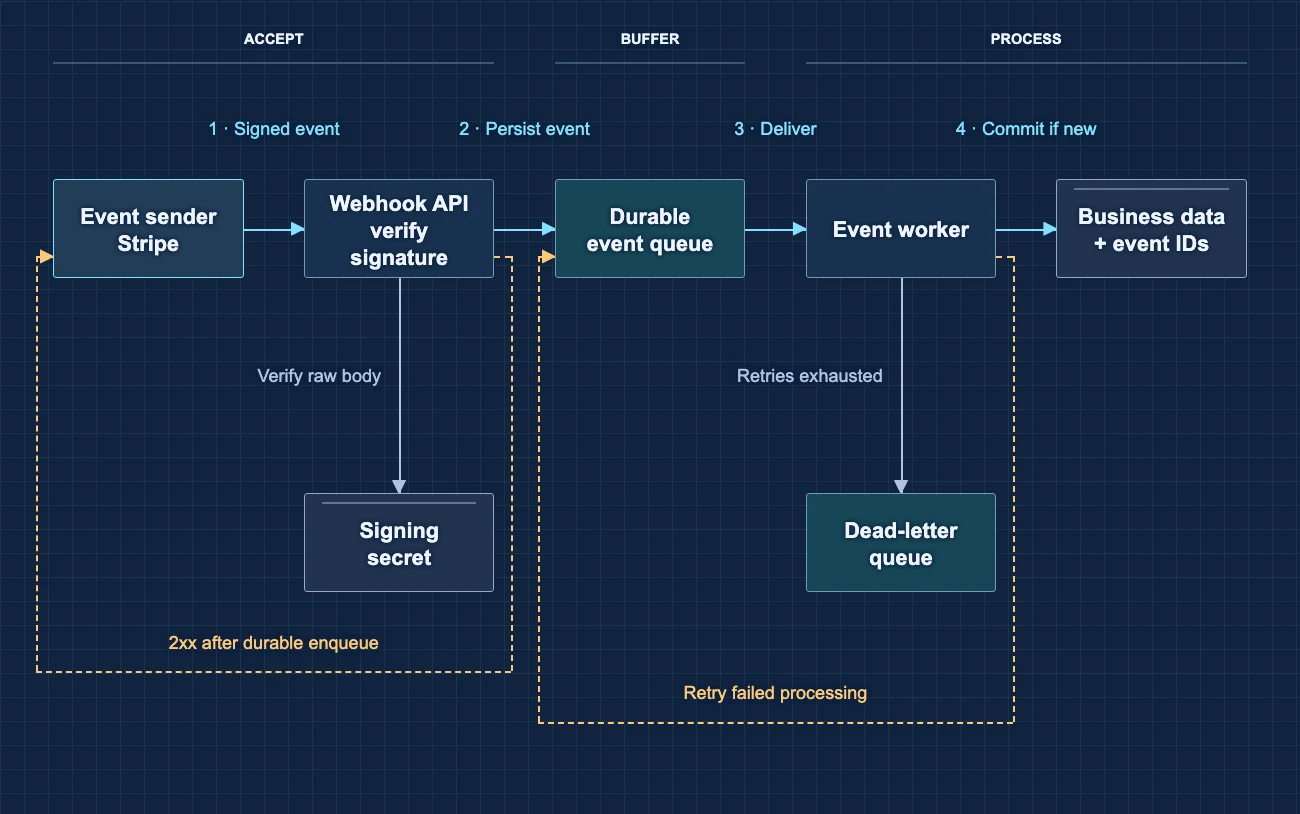
Follow the request, the queue, and what happens when things fail.
Explore the full diagramExplore more AI-made HTML examples · Give your artifacts a reusable style
03 / FROM YOUR AGENT TO YOUR AUDIENCE
Keep using your agent. Add our recipes, hosting, and sharing tools.
Connect share/artifacts through MCP. Ask for a relevant recipe and describe your audience and source material.
Your agent builds with our guidance. Check the facts, design, and private details before approving publication.
We host the approved page. Check the result and choose who can open it before sending the link.
04 / YOUR WORK STAYS WITH YOU
Connect compatible agents to the same share/artifacts account. Your published artifacts belong to your account, not one agent’s conversation.
Save visual and writing preferences for reports and dashboards. Reuse them with agents you authorize. Explore saved styles.
Publish owner-only for review or explicitly choose another access mode. Learn how private sharing works.
Update the same artifact with revised HTML. Readers can reopen or refresh to see it. See the update workflow.
Only submitted HTML is published—not your conversation history. See static HTML protections and limits.
QUESTIONS BEFORE YOU SHARE
An AI artifact is a standalone output, such as a report, diagram, or presentation, that you can use outside a conversation. share/artifacts focuses on artifacts made as static HTML pages.
Connect a compatible agent to share/artifacts through MCP. Ask it to use a relevant recipe to create your HTML artifact. Review the draft, approve publishing, then check the hosted page and choose access before sending the link.
No. We publish only the HTML your agent submits. It may contain details from your conversation, so review the draft for private information before publishing.
Yes. New pages start owner-only. Choose password protection, verified email recipients, or an organization email-domain rule, with optional expiration. Reader requirements depend on the access mode; an unlisted link alone is not access control.
Yes. Give your connected agent the existing page ID or share URL and complete revised HTML. Ask it to update that artifact. Readers see the latest successful update when they reopen or refresh; the link, access settings, and expiration stay the same.
We host static HTML, not arbitrary files or interactive apps. Scripts, forms, embeds, and external API calls are disabled. External images and fonts may still load. Review the published page before sharing.
CREATE WITH YOUR AGENT · SHARE WITH US