For decks you need to send as they are, Claude with Super Document Skills won the blind test. SlideSpeak looks good, but its slides broke and its arguments left out the other side.
Same requests and notes. Decision decks, judged in blind pairs.
The short answer
We gave SlideSpeak and Claude Code with Super Document Skills the same two decision-deck requests and notes. A blind reviewer would send SlideSpeak’s decks as they are in 0 of 8 pairings and found a broken layout in all 8. It would send Claude’s decks with the skill 4 of 4 times, and picked the skill’s deck in 7 of the 8 pairs.
01 / At a glance
How SlideSpeak and Super Document Skills differ
Feature
SlideSpeak
Super Document Skills
What it is
An AI presentation web app
A free skill set for Claude Code and Codex
Where you make the deck
In SlideSpeak’s app, from a prompt or uploaded document. An API and an MCP server are also offered.
Inside the agent you already use, from your notes, files and context
Price
Free plan with 100 credits (our decks used 40 and 25). Paid plans from about $29 a month.
Free and open source (MIT)
Output
PowerPoint-style decks. PDF and PPT export are listed on paid plans.
An HTML deck: present in a browser, print to PDF or publish as a private or shared link
Checks its own slides
Not that we saw: the reviewer found broken labels or overlapping text in 8 of 8 pairings
A checker screenshots every slide and the agent fixes overflow, one-word lines and unlabeled charts
Shows the options you don’t favour
Each option gets a slide; the reviewer said two got “only token coverage”
Every option gets the same numbers, and the deck says what the recommendation gives up
Brand and style
Designs to pick from; brand kits on Premium Plus
Any style you describe; your own template and layout win
Editing
Visual slide editor
Ask your agent, or edit the HTML
Also does
AI video, narration, translation, quizzes
Reports, briefs, roadmaps and diagrams with the same skill set
02 / Blind test results
Which decks would a reviewer send?
8 blind pairs: each SlideSpeak deck against 4 skill decks for the same request
What the reviewer found
SlideSpeak
Claude + skill
Codex + skill
Would send as it is
0 of 8
4 of 4
2 of 4
Picked to send, of the pair
1 of 8
4 of 4
3 of 4
Looks better, of the pair
1 of 8
4 of 4
3 of 4
Broken layout
8 of 8
0 of 4
0 of 4
States something not in the notes
0 of 8
0 of 4
2 of 4
SlideSpeak’s one win was its punchy build-or-buy deck against a Codex deck the reviewer found wordy, “like an analyst memo”. Even then it said it would send SlideSpeak’s deck “once slide 4 is fixed”.
Neither SlideSpeak deck stated anything that wasn’t in the notes. Two Codex decks with the skill did.
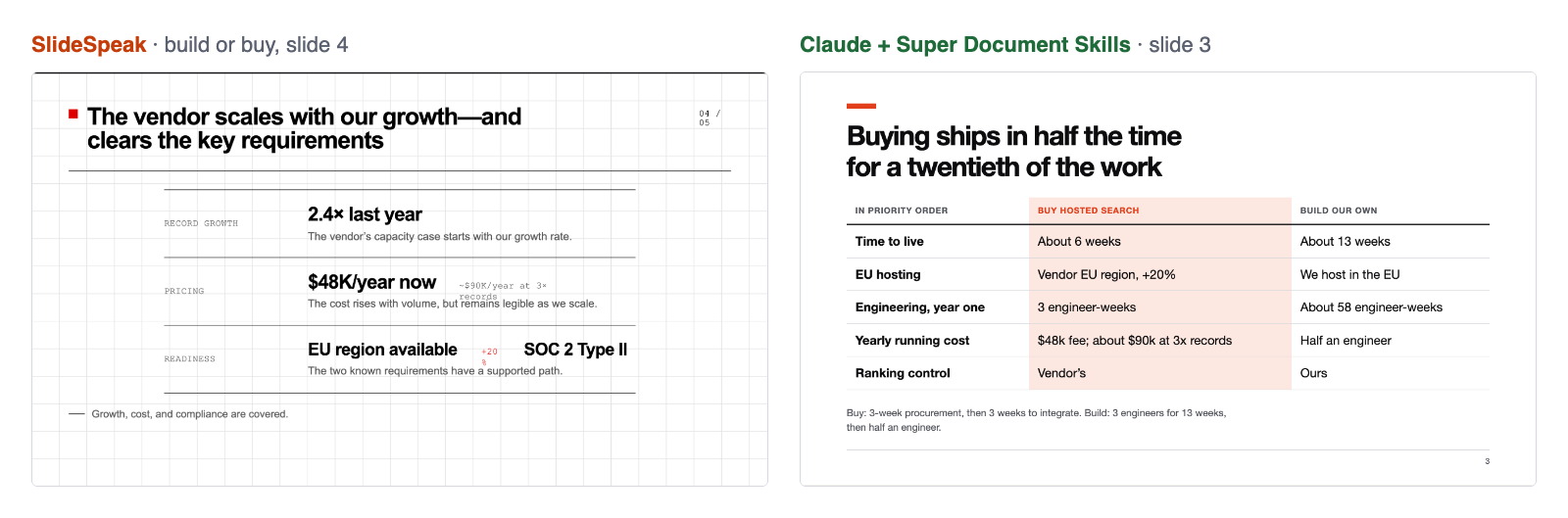
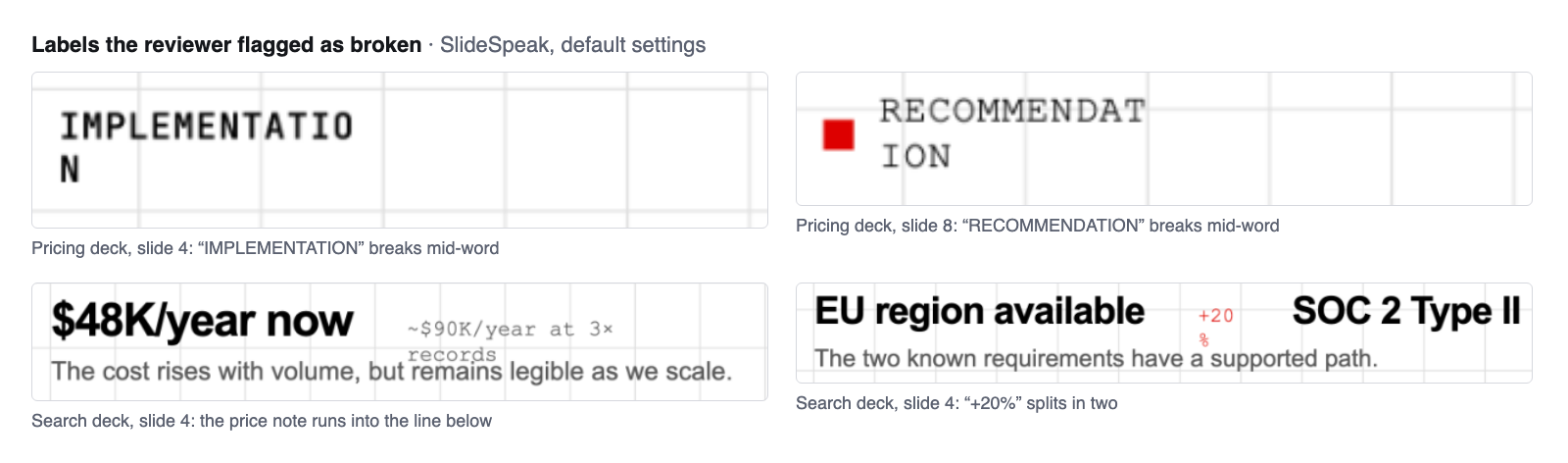
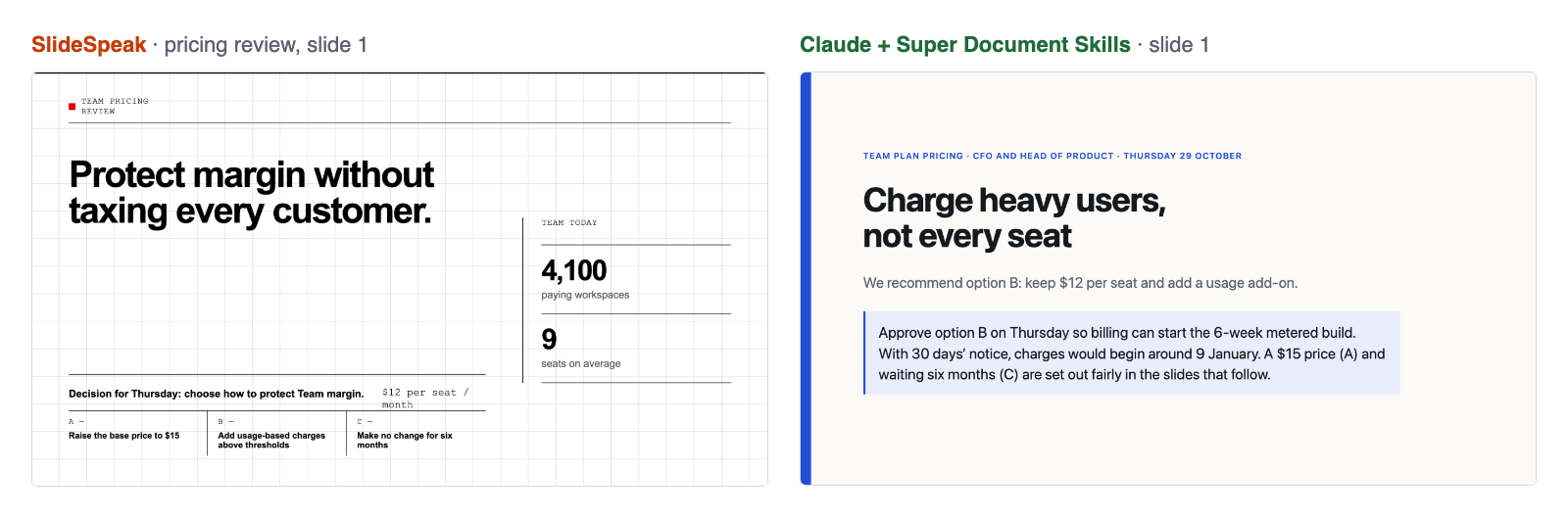
Build or buy, same request and notes. SlideSpeak’s price note runs into the line below and “+20%” splits in two. Claude with the skill still recommends buying, and shows what buying gives up: ranking control.Close-ups from SlideSpeak’s two decks at default settings. Each takes seconds to fix in its editor, once you find it.Slide 1 of the pricing review. SlideSpeak sets up the decision and the three options; the skill’s deck also states the recommendation and the ask, with the date charges would start.
03 / Strengths
Where each one wins
SlideSpeak does well
Claim titles instead of topics, and one slide per option
A strong editorial look; the reviewer called it “striking” and credited it with more visual style
Nothing invented: both decks stuck to the notes
PowerPoint files, brand kits, a visual editor, translation and narrated video
Super Document Skills does well
Slides that don’t break: 0 broken layouts against 8 of 8
Both sides shown: every option on the same numbers, and what the recommendation gives up
Slide 1 carries the recommendation and the ask, with dates worked out from the notes
Works inside Claude Code or Codex, from your own notes and files, for free
04 / Which to use
Should you use SlideSpeak or Super Document Skills?
Choose SlideSpeak if
You want a web app rather than an agent, you need PowerPoint files in a brand template, and you’ll check every slide before you send it.
Choose Super Document Skills if
You already use Claude Code or Codex and want a deck you can send as it is: the argument fair, the slides checked, from your own notes.
05 / Method
How we tested
Two decision-deck requests held out from the skill’s tuning: a pricing review with three options for a CFO, and a punchy build-or-buy deck for a CEO. Both came with the same notes.
SlideSpeak on its free plan on 31 October 2026, every setting at its default (SlideSpeak AI 5.0, default design, automatic length). Slides captured from its presentation mode, unedited.
The skill’s decks are the ones from our published release test, made by Claude Code (Claude Opus 5.5) and Codex (GPT-6.1 Sol), two runs each. Not remade for this comparison.
A Claude model read every slide of both decks in each pair, in random order, without knowing which tool made which, answered a fixed checklist and picked the deck it would send.
Limits
Two SlideSpeak decks, each judged four times, by a model rather than people.
SlideSpeak at its defaults, without using its editor to tidy the slides.
Our check of what each decision depends on reads a deck’s text, so it couldn’t score SlideSpeak’s slide images and isn’t reported.
06 / Questions
SlideSpeak vs Super Document Skills: common questions
Is there a free SlideSpeak alternative for Claude?
Yes. Super Document Skills is a free, open-source skill set for Claude Code and Codex. Your agent makes the deck from your own notes, checks every slide, and you can present it in a browser, print it to PDF or publish it as a link. In our blind test a reviewer would send Claude’s decks with the skill 4 of 4 times, and none of SlideSpeak’s as they were.
Can SlideSpeak make decks inside Claude?
SlideSpeak offers an MCP server and an API, so Claude can ask it for a deck; SlideSpeak then generates it on its own service. Super Document Skills works the other way: Claude itself writes the deck, following a tested method, and can use everything in your conversation and files.
Does Super Document Skills make PowerPoint files?
No. It makes HTML decks, which present in any browser, print to PDF and can be published as a private or shared link with share/artifacts. If you must hand over a .pptx in your company template, a PowerPoint tool such as SlideSpeak fits that better.
Is SlideSpeak’s free plan enough to try it?
It gave us 100 credits. Our 8-slide deck used 40 and the 5-slide deck used 25, so about two or three decks. SlideSpeak’s pricing page lists PDF and PowerPoint export on its paid plans.
Who judged the decks?
A Claude model acting as a blind reviewer, using the same checklist as our published release test: invented facts, plain or template look, broken layout, wordiness, working notes left in, and whether it would send the deck as it is. No human panel has judged these decks yet.
For Codex, use --agent codex. Using Claude in the browser? Connect share/artifacts and your agent gets the same deck recipes, then publishes the deck as a private or shared link.