For larger text, use “Read or print.”
Parity
Large binary strips separate data from the parity cell, highlight changed positions and give the passing counterexample its own slide.
Design study · 4 slides
Using Claude Code or Codex? Install the free presentation skill.
Source and instructions
Source notes
FROZEN WORKED COMPUTING LESSON BRIEF · PARITY
Audience: beginning computing students. Purpose: explain an even-parity bit and its limits with an exact toyexample. This is not a productionprotocol or security recommendation.
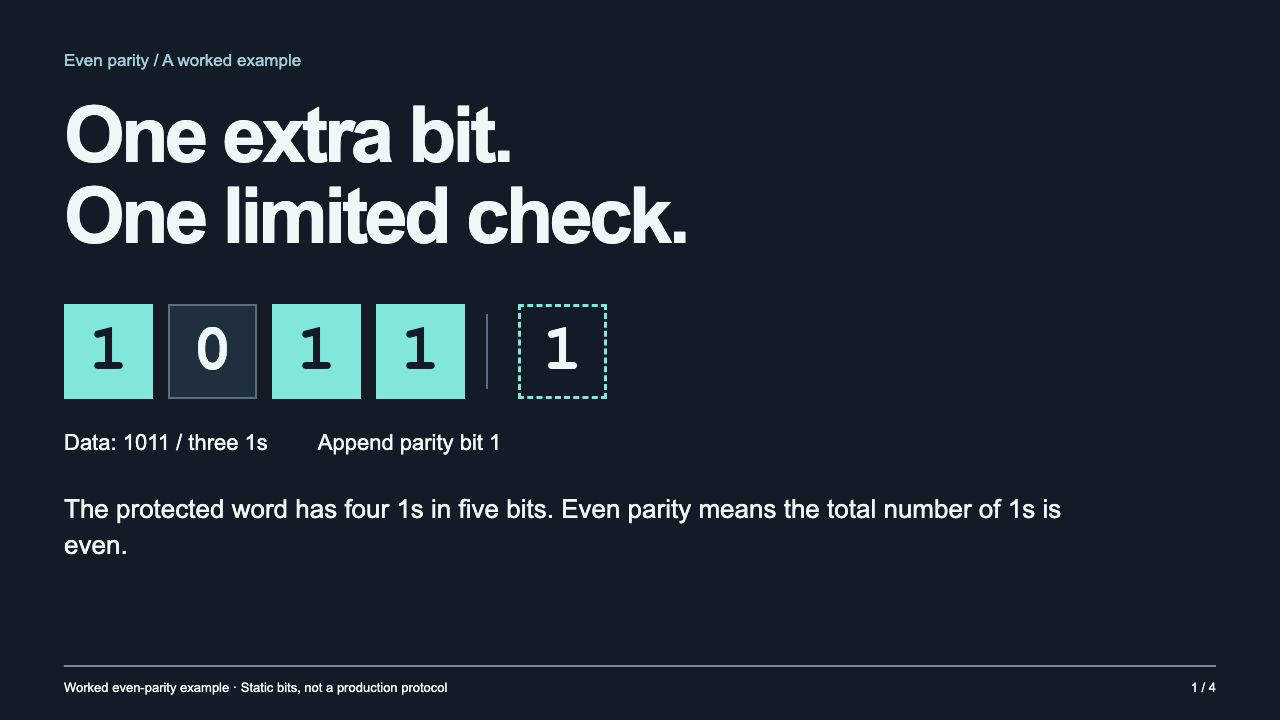
Start with four data bits1011. They contain three1s, so append paritybit1 to make the total number of1s even. Sent word:1011|1, four1s in fivebits. The verticalbar separates data fromparity and is not a bit.
Onebit example: flip the third data bit from1to0. Receiveddata1001, retainedparity1:1001|1, three1s total, odd. Even-parity check flags a change; it does not locate or correct it.
Twobit example: from the original sentword flip firstandthird databits1to0. Receiveddata0001, retainedparity1:0001|1, two1s total, even. The check passes although the data changed. This demonstrates a limitation, not a checksum collision rate or realnetworkerror probability.
Generalrule: even parity detects any oddnumberof bitflips across the protectedword, including paritybit flips. An evennumberof flips can leave parity unchanged. A passingcheck alone doesnot prove unchangeddata or provide authentication/encryption. No recovery capability, encryptionstrength, measuredreliability ornetworkimplementationclaim.
Four slides: build paritybit; oneflip flagged; twoflips canpass; recapunchanged/oneflip/twoflip cases with exactcounts and limitations.
Visualdirection: big selectable native bitstrips, a distinct outlined paritycell, highlighted changedbits and counted1markers on navy, mint and amber. These are static explanatory diagrams, not interactive switches or realtrafficlogs. No image required; if optionalimagegeneration isunavailable continuewithcomplete native bitdiagrams.
Design instructions
Parity: a bit-level explanation language in navy #101e2c, white #eff9fa, mint #78ece0 and amber #ffb384. Build large selectable native bit strips, separate the parity cell with an outlined treatment, and highlight changed positions without altering the source bits. Pair each word with a count and plain-language outcome; color alone must not carry pass/fail. Let the counterexample earn its own slide rather than burying the limitation in a footnote. Keep data, parity and separator meanings explicit and preserve the exact worked transformation. Adapt this visual grammar to supplied discrete logic, not this particular bitstring, and distinguish a toy example from production telemetry or a security guarantee. Native bits, counts and outcomes are the evidence and need no image tool. When optional generated imagery is available and useful for another brief, keep it clearly conceptual and separate from the logic. If unavailable or failed, continue with the complete native strips and comparisons; remove optional image slots. Preserve all limits, units and factual uncertainty.

Use my supplied content and the format I requested. Keep its facts, numbers, denominators, uncertainty and conclusion. Do not inherit the example deck’s story, figures or recommendation. The visual direction guides design; the audience and argument determine the slide sequence.

Check the tools available in this session. When an image would improve the presentation and a suitable generation tool is available, generate an original image or use an asset I am authorized to supply. If optional generation is unavailable or fails, continue with a complete image-free composition. Reclaim the space, leave no placeholders, and do not ask me to enable a tool or delay the deck for optional imagery. Mention a failure in the handoff rather than on audience-facing slides. If I explicitly require a particular image, preserve that requirement and explain any unmet dependency.

Keep text and evidence selectable. For HTML, use one self-contained static document with embedded CSS, compressed data images and licensed embedded fonts when needed; do not add scripts, forms, remote calls or authored slide controls. Preserve font licenses and asset provenance. Label conceptual or generated imagery when it could be mistaken for real product, customer or event evidence. Never invent a product screenshot to prove a feature.

Render every slide and inspect the actual result before handing it over. Check crop, contrast, type hierarchy, labels, overflow and source fidelity. Use at least 4.5:1 contrast for body text and 3:1 for large text. Check the destination’s file/data-image limits before any separately authorized publication. If visual checking is unavailable, say so in the handoff.About this design study
Four worked lesson slides build an even-parity bit, compare one and two changed data bits, and preserve the limits of the check. Independently authored worked computing lesson using static native diagrams. It is not real traffic, a production protocol, a measured reliability result or a security guarantee.