We wanted customers to publish a page from an AI client using the same account they already used in share/artifacts.
We added the Model Context Protocol (MCP) and connected its tools to our existing backend. Our accounts, page ownership, and publishing rules stayed in the application.
Then we connected external clients. Our first Smithery fix missed a second client identity. Glama needed another consent flow before it could maintain access through refresh tokens.
If you are adding MCP to your own product, these are the decisions worth understanding. This article covers existing accounts, MCP authentication, permissions, and client connections.
This website edition adapts my September 2026 integration account. The Cursor, Smithery, and Glama observations describe those tests and configurations, not a compatibility guarantee for every current client version.
Start with the app you already have
For a solo founder, a second set of account and permission rules means more code to maintain. We kept those rules in our existing backend.
Our MCP tools call the application operations that handle page ownership, publishing limits, and sharing settings. The MCP layer translates a tool request into one of those operations.
For example, a request to update a page includes a page identifier. The backend still checks whether the user can change that page.
This gave us a useful boundary: MCP adds another way to request an action. The application remains responsible for deciding whether that action is allowed.
If your permissions exist only in interface code, this is a gap to close. Hiding a delete button does not protect a delete operation exposed through MCP.
Choose how customers will connect
The connection method affects the setup your customers must complete.
With an API token, the user creates a token in your app and supplies it to a compatible client. The token needs limited permissions and a way to revoke access.
With OAuth, the client opens your authorization flow. The user signs in and approves access. The client receives a token without receiving the user’s password.
We use a personal API token for our local MCP adapter and OAuth for our hosted endpoint. Both paths lead to backend permission checks.
Your choice depends on the clients and connection process you want to support. A token that works in your own configuration does not establish support in every customer’s client.
The MCP authorization specification describes the OAuth flow for HTTP connections. Local standard-input/output connections use a separate credential model.
Your existing login is part of MCP authentication
A customer should be able to connect the account they already use. That does not mean the existing login page completes the whole connection.
Login identifies the user. OAuth lets that user grant an external client permission to act for them.
A “Sign in with Google” button illustrates the difference. In that flow, your app receives identity information from Google. For MCP, an authorization server must issue access tokens that your MCP server accepts.
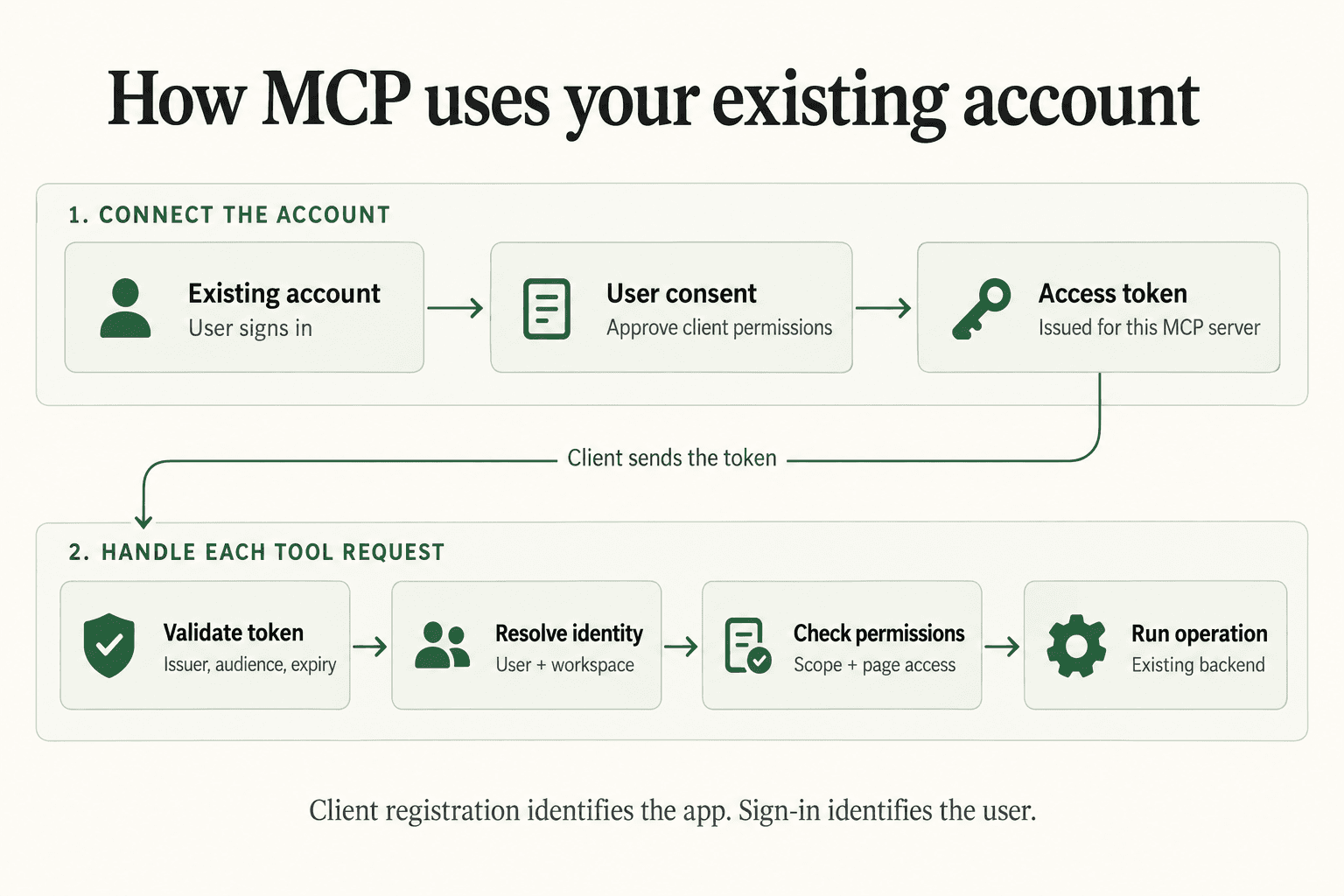
We use Better Auth and its OAuth provider. Our existing sign-in identifies the share/artifacts user. A consent page then records the permissions granted to the connecting client.
The OAuth provider supplies protocol components, including authorization and token endpoints. Our app supplies the account relationship, consent experience, supported permissions, and resource access rules.
This division is useful when choosing a library. A library can handle the token exchange. It cannot decide whether a particular customer owns a page in your database.
Make the connection understandable to the user
From the customer’s side, the process should be clear: choose the server, sign in, review access, and connect.
Behind that process, the client discovers your authorization server and identifies itself. It requests permissions and supplies a callback address for the authorization response.
After consent, the authorization server returns a short-lived code. The client exchanges the code for an access token, then uses that token to call the MCP server.
Our flow uses Proof Key for Code Exchange (PKCE). The client must supply a verifier during token exchange. This prevents a stolen authorization code from being sufficient on its own.
Cursor gave us an early lesson about this user experience. In our September 2026 test, the first agent environment could not complete interactive authentication. A later interactive CLI flow opened the browser for sign-in and consent, then returned all 15 tools available in that version.
The plugin could be present while the account connection remained incomplete. Those are separate states that a customer needs to understand.
Connect every tool request to the correct account
Our hosted server validates the access token and uses its subject to identify the user. The application then resolves that user’s personal workspace.
The caller cannot select an arbitrary workspace through a tool argument. Supplying a page identifier also does not grant access to that page.
The request passes through these checks:
- Validate the token and active connection.
- Identify the user and workspace.
- Check the required scope.
- Call the shared application operation.
- Enforce page permissions and publishing rules.
A scope does not establish ownership
A scope is a named permission that limits a client’s actions. Our pages:read scope permits reading operations, but only for pages the user may access.
Our pages:write scope includes publishing and deletion. That is a broad permission, which the consent experience needs to explain.
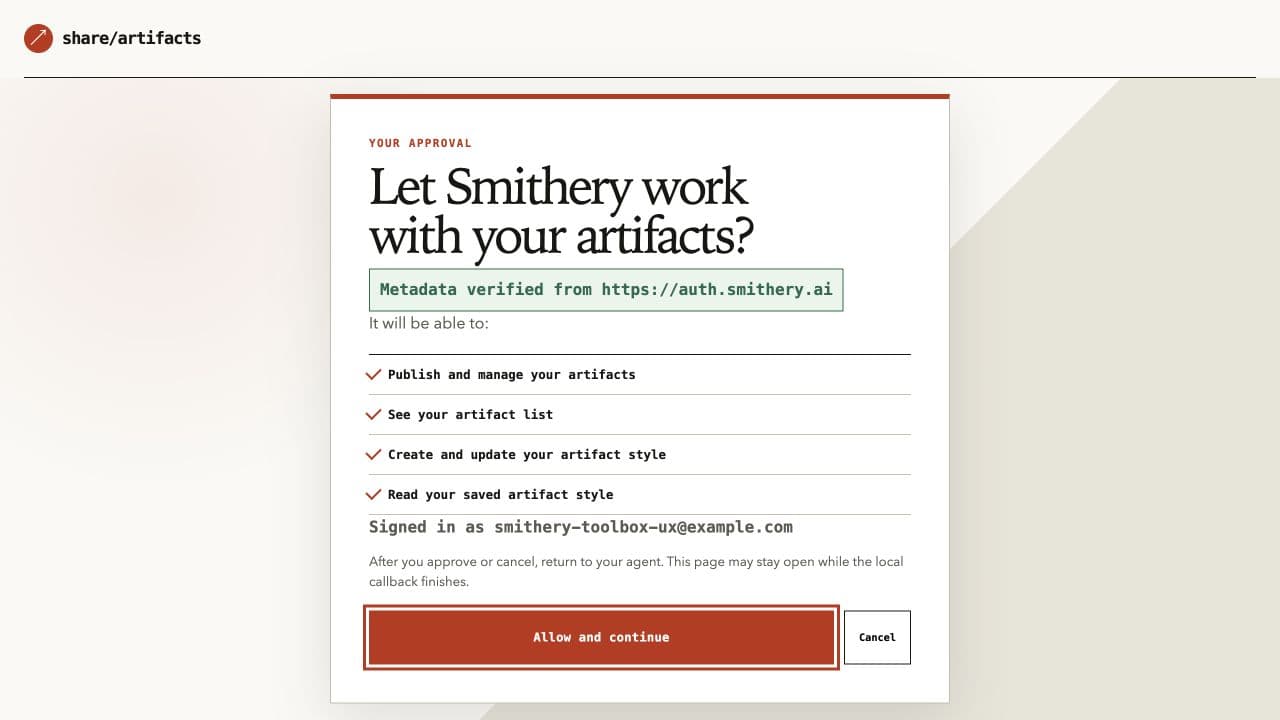
If your product needs separate approval for deletion, its permission design must support that distinction. A read-only annotation or reassuring tool description cannot enforce it.
We also validate the token’s issuer, intended resource, expiry, and active connection. A token issued for another service does not grant access to our server.
Expect client registration to need attention
Before a client can request account access, it needs a client identifier and an accepted callback address. Client registration is separate from customer registration.
A known client can use a registration created in advance. We also support two methods that let external clients connect without that manual setup.
With an OAuth Client ID Metadata Document (CIMD), an HTTPS identifier points to a document describing the client. With Dynamic Client Registration (DCR), the client submits registration information to the authorization server. The July 2026 MCP specification prefers CIMD and retains DCR for backward compatibility.
A submitted client name does not prove company ownership. Fetching a metadata document also requires controls on network destinations, response size, and request time.
The MCP project’s registration explanation covers the identity problems behind these methods.
The registration request we had not covered
Glama exposed assumptions in our registration handling. The September request we observed used HTTP Basic client authentication at the token endpoint. Its callback list included both an HTTPS address and an HTTP loopback address.
We added support for that configuration within our registration policy. This client authentication remained separate from the user’s sign-in and consent.
Our first Smithery fix was incomplete
Smithery supplied a client identifier under connect.smithery.ai. Its optional website field, client_uri, pointed to smithery.ai.
Our authentication library required these origins to match and returned invalid_client. The user could not complete the connection.
This was a library validation policy, rather than a universal OAuth requirement for a client’s website address.
We added a limited adapter that omitted the optional website field for the exact expected metadata combination. The client identifier and callback checks remained in place.
One provider had two client identities
Then the actual Smithery toolbox used another identity: auth.smithery.ai. Our first change had not covered it.
We added the second identity with its own callback. Each client remained bound to its corresponding callback.
The error involved an optional website address. Broadening where we could send authorization codes would have changed a different security control.
For us, the lesson was to understand the rejected field before changing the policy. One provider name did not mean one OAuth client.
A connected account still needs a lifecycle
A connection must keep working after the first access token expires. It must also stop working when the user removes access.
The Glama authorization request we observed in September did not include offline_access. In our configuration, the connection therefore received no refresh token.
We completed a new authorization flow with explicit consent for refresh access. During that test, we observed five refresh-token rotations and a successful connection after the original access token expired.
The request and issuance rules depend on the authorization server. Receiving an initial access token does not establish that continued access is configured.
Disconnect must end access
Disconnection has a similar detail. Deleting a browser session does not necessarily revoke the client’s access. Removing a refresh token can still leave an existing access token valid until expiry.
Our server checks a connection version stored for each user and client. Disconnecting changes that version, so older tokens no longer match an active connection.
This adds a server-side lookup, but it makes our disconnect action effective before the access token expires.
What I would carry into the next integration
For a founder maintaining the whole product, keeping one set of application rules is a practical advantage. Each new client can use the same account and resource permissions.
Our auth library handled protocol components. We still had to decide what access meant, explain it to the user, and support the client configurations we encountered.
The Smithery issue changed how we handled specific metadata. The Glama issue changed how we completed refresh authorization. Neither required another user database or a second set of page ownership rules.
Connect MCP to the product’s existing account model, then handle client differences at the connection layer.
Before adding your next tool, trace one request for a private record. Identify where your backend checks the user, the granted permission, and access to that record.
That path shows which rules your app can reuse and which checks you still need to add.
For the current share/artifacts connection instructions and tool catalog, see the MCP reference.