The short answer: install a deck skill that gives your agent a tested method for the kind of deck you need, give it your notes and say who the deck is for, and let it render and fix every slide before it hands the deck over. In our blind test, a reviewer would send 45 of 48 Claude Code decks made this way as they are, against 5 of 48 made without the skill. For Codex it was 42 of 48, against 11.
Claude Code and Codex can already write a good-looking HTML deck. The trouble is what you have to fix before anyone sees it. This guide shows what goes wrong, then the six steps that got both agents to decks a reviewer would send.
What goes wrong when Claude Code or Codex makes a deck on its own?
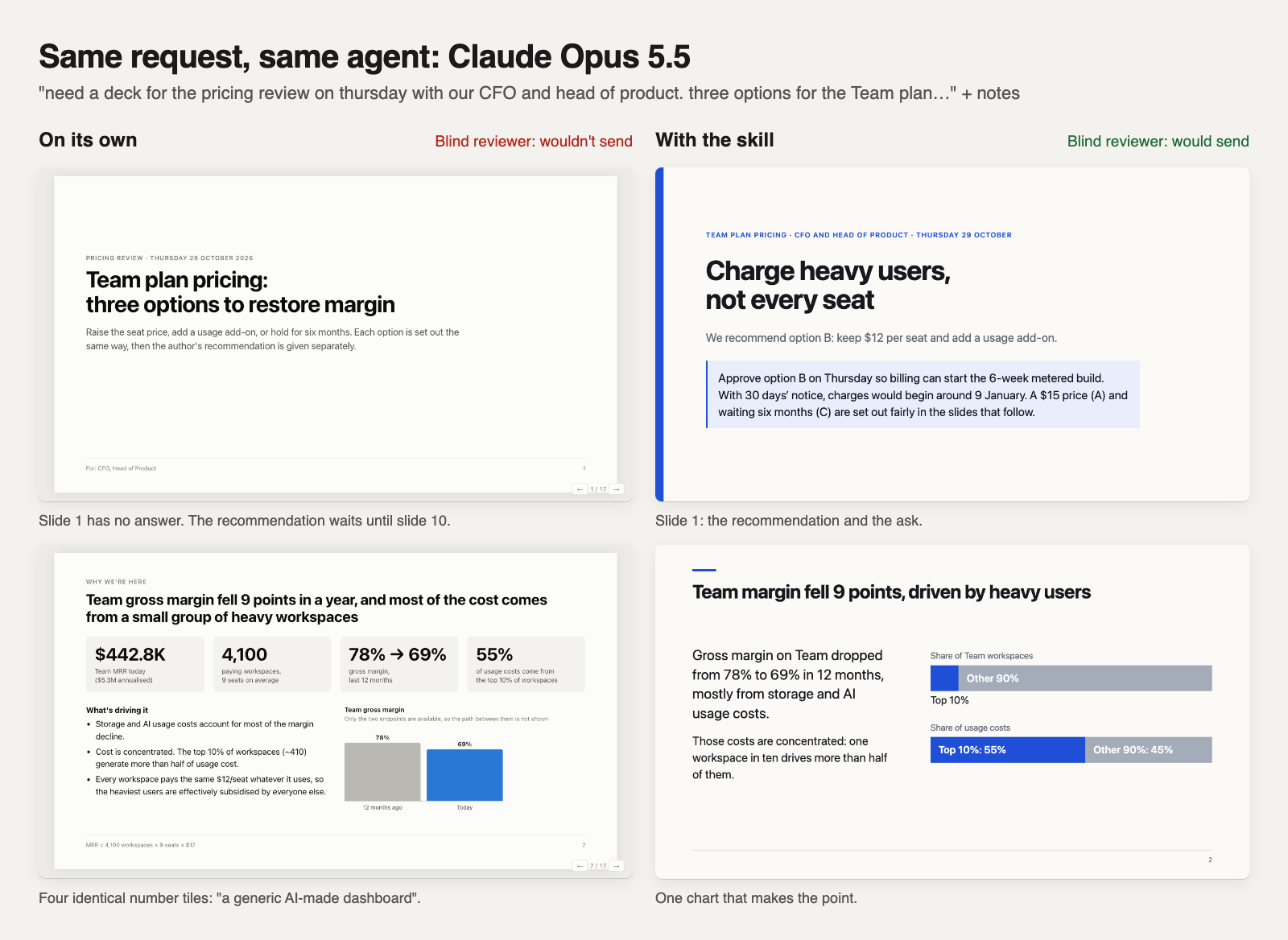
We gave both agents the same 24 requests for four kinds of deck: a product decision, a product update, a roadmap, and a talk or lesson. Each made every deck twice, on its own and with the skill. A reviewer that didn’t know which was which read every slide and answered a fixed checklist built from what people complain about in AI-made decks.
| Problem | Claude on its own | Claude with the skill | Codex on its own | Codex with the skill |
|---|---|---|---|---|
| States something not in the notes | 39 | 3 | 26 | 2 |
| Broken layout | 20 | 0 | 19 | 1 |
| Looks like a template or AI default | 22 | 0 | 1 | 0 |
| Too long for what was asked | 20 | 2 | 24 | 0 |
| Working notes left on a slide | 19 | 2 | 31 | 12 |
| Would send as it is | 5 | 45 | 11 | 42 |
The two agents fail differently. Claude on its own reaches for the same look: a centred title, rows of identical number tiles, emoji in the headings. Codex on its own runs long and leaves its working on the slides: “source: supplied notes”, “proposed owner”, “dates need reconfirmation”. Both make things up, and both bury the point.
Step 1: install a deck skill your agent will use
A skill is a folder of instructions and files your agent reads when a task matches it. Ours is free and open source. In a terminal:
Claude Code:
npx skills add arunai30/super-document-skills --agent claude-code --skill create-html-presentation --copyCodex:
npx skills add arunai30/super-document-skills --agent codex --skill create-html-presentation --copy
No account is needed, and the deck stays a local HTML file. If you use Claude in the browser or another agent that can’t install skills, connect share/artifacts instead: your agent fetches the same deck recipes from us.
Step 2: give it your notes and say who the deck is for
You don’t need a long prompt. The skill picks the method from what you ask for, so say what the deck has to do and who will read it, and paste the facts. These are requests from our test, written the way people send them:
- A decision: “need a deck for the pricing review on thursday with our CFO and head of product. three options for the Team plan…” plus the numbers.
- An update: “CEO wants the growth update in 5 slides. punchy, no fluff…” plus the month’s results and what’s still unknown.
- A roadmap: “CEO wants next year’s roadmap as a timeline, 5 slides, punchy. we need her to pick between two orders…” plus the work and estimates.
- A lesson or talk: “I need a fun, friendly slide deck for my 8th grade science class on why the moon has phases. 25-minute lesson.” plus what to cover.
- From a doc: paste the memo and ask for the deck. The skill keeps your conclusion, reasoning and caveats.
The skill sent almost every request like these to the right method: 24 of 24 updates, 12 of 12 decisions and 18 of 18 talks, lessons and recuts on both agents, and 12 of 12 roadmaps on Claude (10 of 12 on Codex, which sent an approve-or-decline re-plan to the decision method).
What you give it is what you get. Every number, cause, plan and date comes from your notes. That’s the biggest single change: decks stating things nobody gave them fell from 65 of 96 to 5.
Step 3: let it render and fix every slide
Agents tend to hand over a deck they’ve never looked at. The skill includes a checker the agent runs before it hands the deck over. It opens the deck in headless Chrome at desktop and phone width, saves a screenshot of every slide, and lists problems slide by slide: text that overflows, a chart with unlabelled bars, a title with one word left on its last line, a slide that’s lopsided, notes like “TBD” or “to confirm”. The agent looks at the screenshots, fixes the deck and checks again.
Broken layouts went from 39 decks to 1 across both agents. You need Node 22 or later and Chrome or Chromium on the machine; if the agent can’t render, it says the slides weren’t visually checked.
Step 4: answer the questions it asks you
When the deck needs something your notes don’t have, the agent doesn’t invent it, and it doesn’t write “TBD” on a slide. A choice only your reader can make goes on the slide as a question. A fact only you know comes back to you in the agent’s reply. Answer it, and the next version has it.
Step 5: make it yours in one line
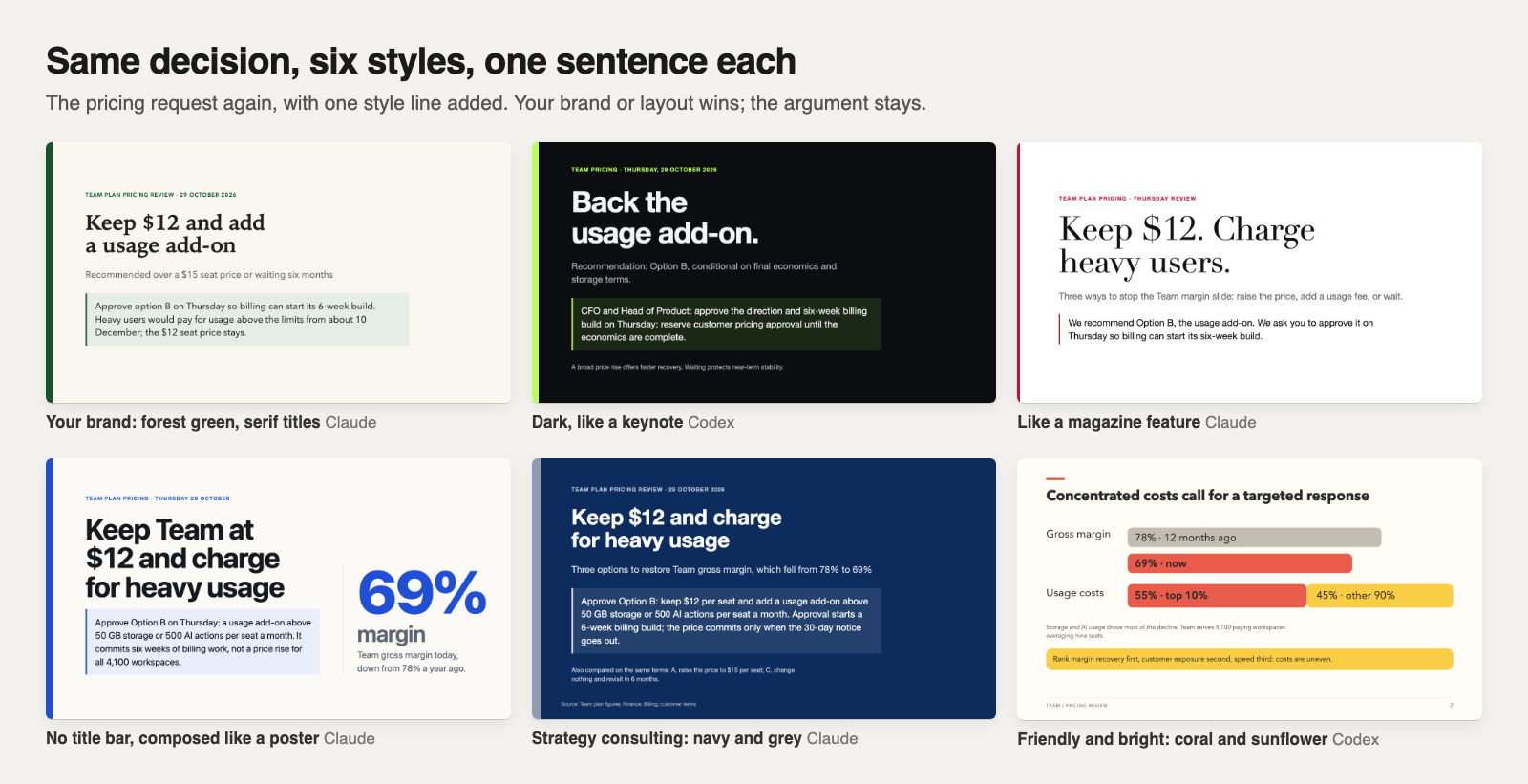
The default look is clean: the title in the same place on every slide, the body balanced under it, and charts and diagrams the agent draws for your point. To change it, say so. One line each got these six versions of the same pricing decision, and the argument stayed the same in all of them. Your brand, your template or your own layout always wins over the skill’s defaults.
Step 6: present it, print it or share it
The deck is a single HTML file. It opens in any browser, works on a phone, and prints to PDF. To send it as a link, ask your agent to publish it with share/artifacts: private or shared, and updated at the same link when you change it.
It isn’t a PowerPoint file. If you have to hand over an editable .pptx, use a tool that makes one; if people just need to read, present or forward the deck, a link is usually easier.
What does each kind of deck get?
- Product decision: the answer and the ask on slide 1, every option including waiting with the same numbers. Would send 9 of 12 (Claude) and 8 of 12 (Codex), from 3 each. Results.
- Product update: where things stand against the goal and the ask on slide 1; unknown causes called unknown; misses get the slides. 12 of 12 and 11 of 12, from 0 and 2. Results.
- Roadmap: quarters or now / next / later, whichever your leader wants; what each order delays on its own slide; a customer version safe to show prospects. 12 of 12 and 11 of 12, from 0 and 2. Results.
- Talk or lesson: about 30 words a slide with speaker notes in the reply, titles that make the point, every step a teacher listed. 12 of 12 for both, from 2 and 4. Results.
- From your doc, or for another audience: keeps the doc’s argument; a recut changes the emphasis and the ask and adds nothing. Results.
How we tested
Claude Code ran Claude Opus 5.5 and Codex ran GPT-6.1 Sol. Each test had six requests written like real ones, with notes; three of the six were held out, so the skill was never tuned on them. The reviewer was a Claude model that read screenshots of every slide of two decks for the same request without knowing which used the skill, answered the checklist and said whether it would send each one. I checked the look of every release myself. No human panel has judged these decks yet. Example decks use fictional companies and numbers.
Two things are still being worked on. Codex with the skill wins on “would send” more often than on looks: in decision decks its version looked better in 5 of 12 pairs. And some decks come out plain when the notes are thin; making those slides carry a drawing of your own numbers is next.
The skill’s source, every request and every result are on GitHub.