The short answer: two decks product managers bring to leadership again and again, the decision deck and the regular update, fail with AI for the same reason. The agent buries the point and fills gaps with things you never said. Give it your notes and a method that puts the answer and the ask on slide 1, sets every option out with the same numbers, says “unknown” when a cause isn’t known, and adds no plans of its own. In our blind test, a reviewer would send 12 of 12 Claude product updates made this way, against 0 of 12 without it, and 9 of 12 decision decks, against 3.
Why do product decks fail with leadership?
Product managers say it plainly. One of the most upvoted posts on r/ProductManagement about decks shares a six-slide update format that ends with what the PM needs from leaders. Another title sums up the problem: “My ‘solid’ status updates were the reason my VP never actually made a decision.” Reviewers check “whether the headline matches the nuance in the data”.
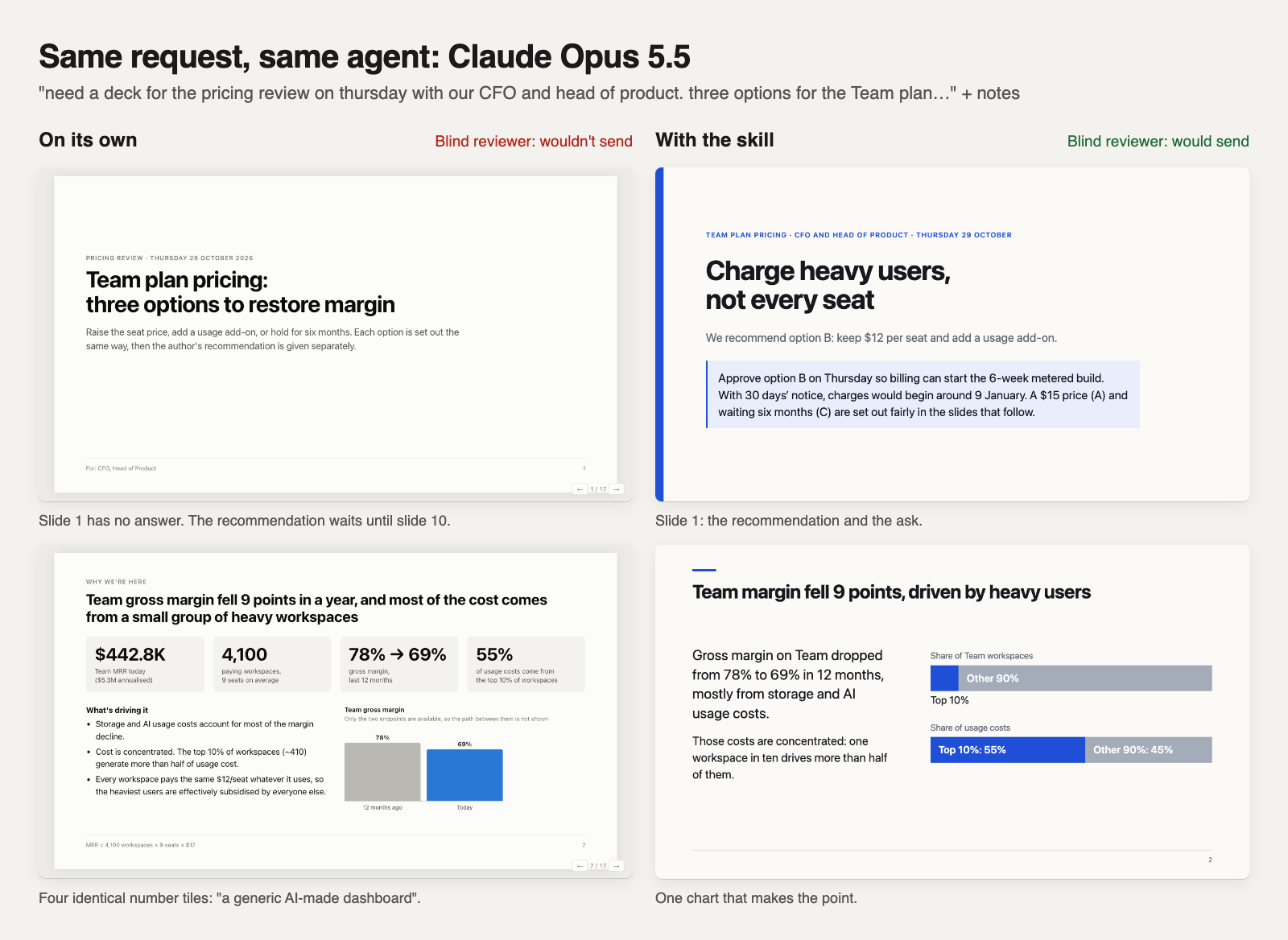
AI makes this worse in two ways. It produces clean slides with no position: three number tiles on slide 1 and the ask on slide 5. And when your notes leave a gap, it fills it: a likely cause for a number, a deadline, an owner, a recommendation. Your VP can’t tell which lines you stand behind.
How do you make a product decision deck with AI?
Give the AI the decision, who decides, the options with their numbers, and your recommendation if you have one. A method for decision decks should then:
- Put the answer and the ask on slide 1, so a reader who stops there knows what you want.
- Make the titles the argument. Read in order, they make the case.
- Set every option out with the same numbers, including waiting, and add up the totals the decision turns on.
- Show the decisive tradeoff in one picture: a to-scale comparison, a timeline or a table.
- Turn gaps into questions. A choice only the reader can make goes on the slide as a question; a fact only you know comes back to you in the agent’s reply. Never “TBD”.
- Use only your facts, and let the content set the length.
How do you make a product update deck with AI?
Give it the goals and targets, the results for the period, what changed, what you know and don’t know about why, and what you need from the reader, if anything. A method for updates should:
- Say on slide 1 how you’re doing against the goal and what you need.
- Show every result against its target and the previous period.
- Match the headline to the nuance. A total that rises while one part falls is said on the same slide.
- Give a cause only when the notes give one. An unknown cause is called unknown, with the possibilities the notes name.
- Spend the slides on what missed or moved. On-track results share one scorecard.
- Make one update from several teams, not a pasted slide per team.
- Report only the asks, plans, owners and dates in your notes. If there’s no ask, say so.
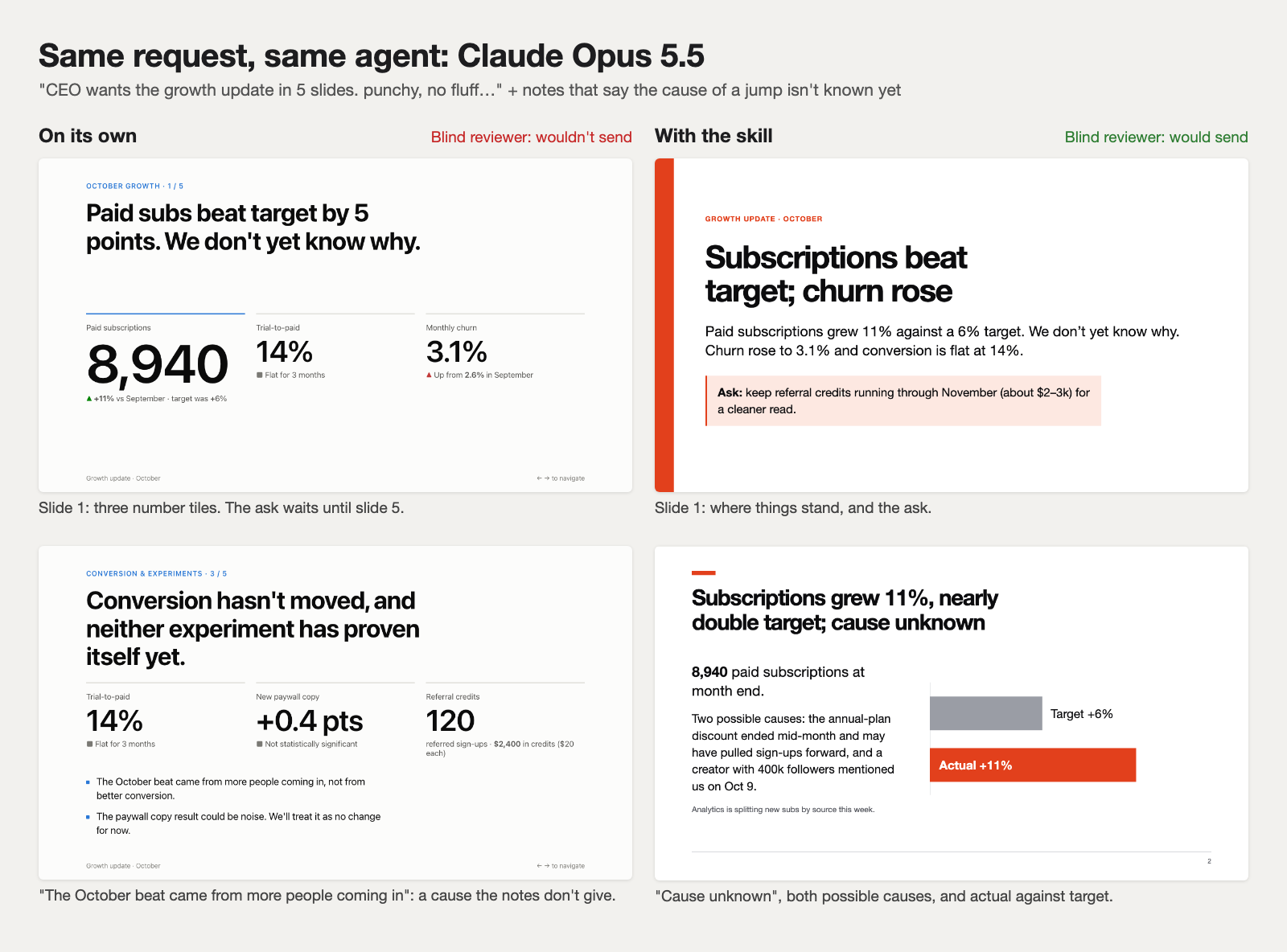
On their own, both agents explained numbers the notes couldn’t explain, in 10 of 24 decks. Asked to let leadership “decide whether we build”, 3 of 4 decks recommended building anyway.
How do you set it up?
- Give your agent the method. In Claude Code or Codex:
npx skills add arunai30/super-document-skills --agent claude-code --skill create-html-presentation --copy(or--agent codex). In Claude in the browser, connect share/artifacts and Claude fetches the same recipes. - Paste your notes and say what the deck is for. A one-off decision goes to the decision method and a regular update to the update method: 12 of 12 decision requests and 24 of 24 update requests went to the right one on both agents.
- Let it check every slide, answer its questions, and share the deck as an HTML file, a PDF or a link you update in place. It isn’t a PowerPoint file.
The full guide for Claude Code and Codex covers each step, and the roadmap guide covers the third deck PMs bring to leadership.
How we tested
Six product decisions and six product updates, written like real asks with notes; three of each were held out, so the method was never tuned on them. Claude Code (Claude Opus 5.5) and Codex (GPT-6.1 Sol) each made every deck twice on their own and twice with the method. A Claude model that didn’t know which was which read every slide and said whether it would send each deck as it is.
| Deck | Claude on its own | Claude with the method | Codex on its own | Codex with the method |
|---|---|---|---|---|
| Product decision | 3 | 9 | 3 | 8 |
| Product update | 0 | 12 | 2 | 11 |
| Problem | Claude on its own | Claude with the method | Codex on its own | Codex with the method |
|---|---|---|---|---|
| Decision: states something not in the notes | 8 | 3 | 8 | 2 |
| Decision: broken layout | 5 | 0 | 6 | 0 |
| Decision: looks like a template | 8 | 0 | 0 | 0 |
| Update: states something not in the notes | 11 | 0 | 5 | 0 |
| Update: too long | 5 | 0 | 6 | 0 |
| Update: working notes left on a slide | 4 | 0 | 9 | 1 |
What’s next: decision decks still have a few lines the reviewer couldn’t trace (16 decks down to 5, not 0), Codex still leaves some working notes on decision slides (8 down to 5), and some updates come out plain when there’s little to show. No product managers have judged these decks yet; we’re putting the principles in front of working PMs next. Every request and number: decision decks and product updates.